
Encode, inspect, analyze, and deliver in one app
Video Commander wraps FFmpeg, ffprobe, MediaInfo, VMAF, and an ISOBMFF parser in a single desktop workspace. Below is what each module does and which formats it reads.
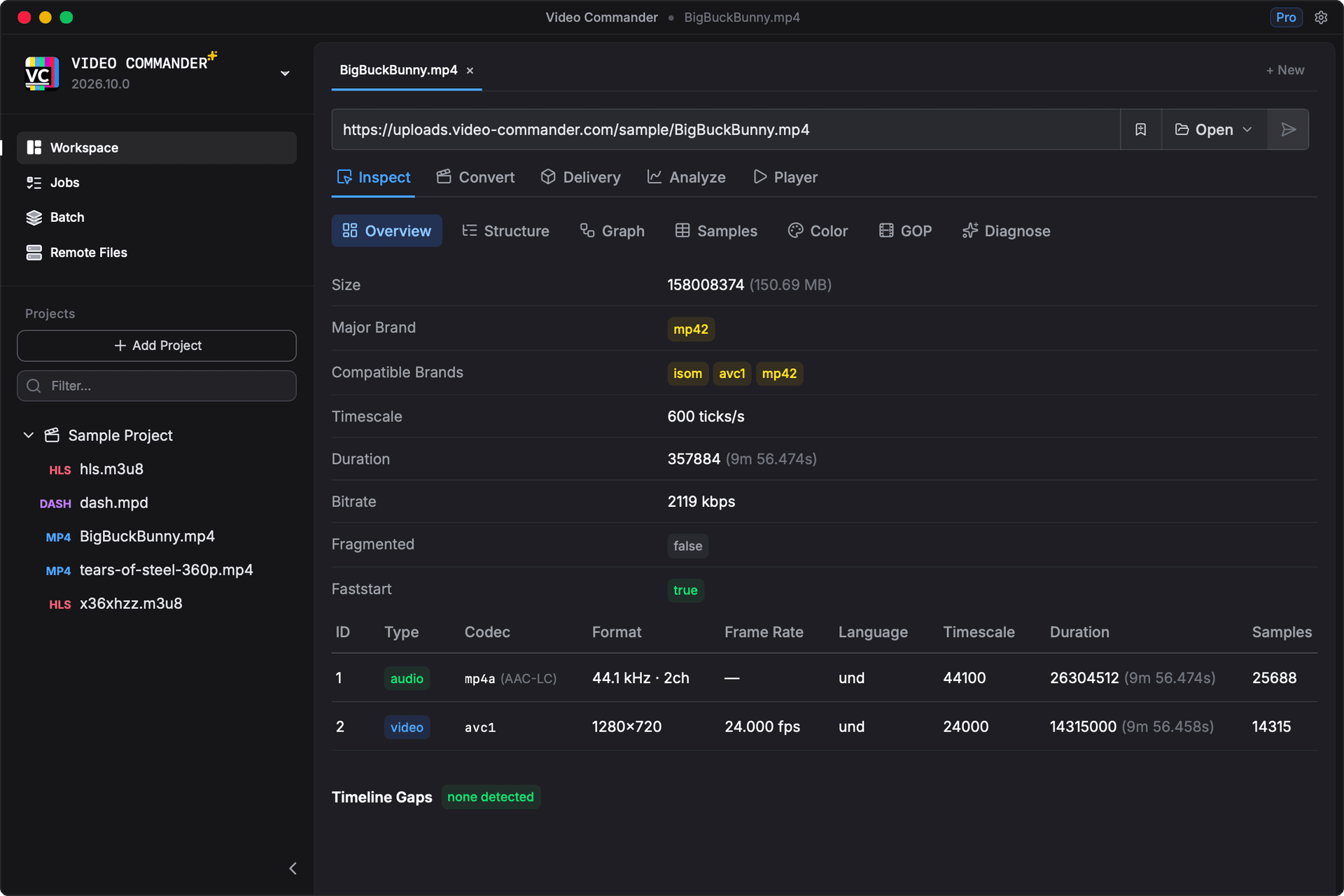
Deep media inspection
Open any local file, remote URL, or file in Amazon S3, Cloudflare R2 & MinIO and explore its full structure: container format, codec parameters, stream metadata, MP4 box hierarchy, hex dump, and frame-level sample tables, down to HDR signalling, embedded captions, ad markers, and DRM protection.
Overview
- Major brand & compatible brands
- File size & bitrate
- Duration & timescale
- Fragmentation status
- Faststart status & one-click remux
- Timeline gap detection
- Per-track stream table
- Track ID, type, codec
- Resolution & frame rate
- Audio sample rate & channels
- Encrypted-track flags
- Language & sample count
Box Tree
- Full ISOBMFF / MP4 box hierarchy
- Box type, size, offset
- Parsed field values per box type
- Hex dump of raw box bytes
- Expandable nested structure
- Cross-link to Box Graph
Box Graph
- Visual DAG of box relationships
- Click-through to Box Tree
- Container and leaf nodes
- Zoomable & pannable canvas
Sample Tables
- Frame-level sample index
- Presentation timestamp (PTS)
- Decode timestamp (DTS)
- Sample size & file offset
- Sync / keyframe flags
- Hex preview of the sample bytes
- Paginated for large tracks
- Per-track selection
Color & HDR
- CICP color primaries
- Transfer characteristics
- Matrix coefficients
- Full / limited range
- HDR10+ (ST 2094-40) detection
- Dolby Vision profile & level
- Dolby Vision layer configuration
- MaxCLL / MaxFALL
- Mastering display primaries
- Mastering luminance range
- Falls back to the SPS VUI with no colr box
GOP Structure
- GOP count & length
- Keyframe interval
- Sync sample count
- Frame types (I / P / B)
- Sync verification
- Broken sample detection
- Paged across every GOP
Subtitles & Captions
- tx3g, WebVTT & TTML / IMSC cues
- Cue & sample counts
- First / last cue timing
- Track duration & language
- Missing language tag warnings
- Embedded CEA-608 / 708 detection
- 608 fields & 708 DTVCC presence
- Caption dropout warnings
- Null-padding detection
Events
- SCTE-35 ad-insertion markers
- Splice points & out-of-network flags
- Break duration
- Event ID & splice event ID
- Scheme ID URI
- Segment-relative timing
- emsg message size
- Encrypted splice detection
DRM
- Per-track encryption scheme
- cenc & cbcs, with scheme version
- Clear vs protected tracks
- Decoded pssh boxes per DRM system
- Protection findings
- Standalone PSSH decoder in Tools
HLS & DASH Manifests
- HLS master & media playlists
- Variant stream table
- Bandwidth, resolution, codecs
- Segment list with durations
- Encryption key info
- DASH MPD periods & adaptation sets
- Representation details
- SegmentTemplate attributes
Sources
- Local file paths
- Remote http(s):// URLs
- Amazon S3, Cloudflare R2 & MinIO (s3://)
- HLS .m3u8 manifests
- DASH .mpd manifests
Supported file formats
Every supported format opens directly: local file, remote URL, or file in Amazon S3, Cloudflare R2 & MinIO. Inspection views adapt automatically based on the container type.
| Format | Overview | Tree | Graph | Samples | Color | GOP | Subtitles | Events | DRM | Manifest | Validator |
|---|---|---|---|---|---|---|---|---|---|---|---|
| .mp4MPEG-4 | |||||||||||
| .movQuickTime | |||||||||||
| .m4viTunes Video | |||||||||||
| .mkvMatroska | |||||||||||
| .aviAVI | |||||||||||
| .webmWebM | |||||||||||
| .mkaMatroska Audio | |||||||||||
| .m3u8HLS Playlist | |||||||||||
| .m3uHLS (legacy) | |||||||||||
| .mpdDASH Manifest |
Color, GOP, Subtitles, Events, and DRM read structures that only the ISOBMFF family carries, and each one appears when the file actually holds that data. A clip with no captions shows no Subtitles tab.
Comprehensive encoding control
Every significant FFmpeg encoding option is exposed through a structured UI, so there are no flags to memorise. See the exact command before you run it.
Video Codecs
- H.264 (libx264)
- H.265 (libx265)
- VP9
- AV1 (SVT-AV1)
- AV1 4:2:2/4:4:4, 12-bit (libaom)
- H.264 VideoToolbox
- H.265 VideoToolbox
- H.264 NVENC
- H.265 NVENC
- AV1 NVENC
- H.264 AMF
- H.265 AMF
- H.264 QSV
- H.265 QSV
- AV1 QSV
- Copy (passthrough)
Quality & Bitrate
- CRF (constant quality)
- Target VMAF
- 1-pass
- 2-pass
- Target bitrate
- Min / max rate
- Buffer size
- GOP size
- Profile
- Level
- Preset
- Tune
- Hardware quality (VBR/CQ)
Resolution & Format
- 4K (3840×2160)
- 2K (2560×1440)
- 1080p
- 720p
- 480p / 360p / 240p
- Custom width × height
- Aspect ratio
- Frame rate
- Pixel format
- Scaling algorithm
- MP4 fast start
Filters
- Deinterlace
- Denoise (hqdn3d / NLMeans)
- Sharpen
- Deband
- Deshake
- Deflicker
- Dejudder
- Crop
- Rotate & flip
- Brightness / contrast
- Saturation / gamma
Audio
- AAC
- MP3
- Opus
- FLAC
- Copy (passthrough)
- Mono / stereo / 5.1 / 7.1
- Bitrate
- Sample rate
- Audio delay
- EBU R128 loudnorm
- Audio contrast
Presets
- 30+ built-in presets
- Grouped by codec family
- Searchable picker
- Platform targets: YouTube, Vimeo
- TikTok, Instagram Reels, X, Discord
- Save your own presets
- Import & export presets as JSON
FFmpeg
- Use the build on your PATH
- Or let the app install one for you
- Or point at a custom path
- Live path verification
- Per-source capability listing
- Video, audio & subtitle encoders
- Containers (muxers)
- Hardware acceleration support
- Build configuration flags
- Automatic install on macOS & Windows
Advanced
- Container: MP4, MKV, MOV, AVI, WebM
- Custom codec & container entry
- Stream mapping
- Trim (start / end)
- Extra FFmpeg args
- Live command preview
- Preview encode before committing
- Read from & write back to S3
- Real-time progress
- Full job log output
Flexible packaging options
Go from a master file to a delivery-ready package in one step. Configure rendition ladders, segment settings, and content protection without touching the command line.
Output Formats
- HLS (.m3u8)
- DASH (.mpd)
- HLS + DASH simultaneously
- Progressive MP4
- CDN-ready folder structure
- master.m3u8 / manifest.mpd
Adaptive Streaming
- Multi-rendition ladder
- 240p · 360p · 480p
- 720p · 1080p · 1440p · 4K
- Custom width × height
- Per-rendition bitrate
- Video codec: H.264, H.265, AV1
- Audio codec: AAC, MP3, Opus
Segment Control
- Segment duration (2–10 s)
- VOD playlist type
- Live playlist type
- HLS version 6 / 7
- DASH live profile
- DASH on-demand profile
Progressive Download
- Multi-quality MP4 output
- Output name pattern
- {name}, {quality}, {date} tokens
- Auto-named from source file
Content Protection
- AES-128 segment encryption
- Key rotation interval
- Custom key delivery URL
Workflow
- Quick-start delivery presets
- Web Streaming preset
- Mobile Optimized preset
- Progressive Download preset
- Premium Streaming preset
- Real-time packaging progress
- Full job log output
HLS & DASH validation
Check manifests for spec compliance and delivery problems before they reach your CDN or players. Findings are surfaced with severity levels and per-rendition filtering, with optional URL reachability probing.
HLS Checks
- HLS_001: no EXT-X-STREAM-INF renditions
- HLS_002: missing BANDWIDTH attribute
- HLS_003: missing CODECS attribute
- HLS_004: differing CODECS across renditions
- HLS_005: missing EXT-X-TARGETDURATION
- HLS_006: segment duration exceeds TARGETDURATION
- HLS_007: EXT-X-VERSION absent or < 3
- HLS_008: EXT-X-PLAYLIST-TYPE not set
- HLS_009: discontinuity without EXT-X-DISCONTINUITY-SEQUENCE
- HLS_010: media playlist has zero segments
DASH Checks
- DASH_001: missing mediaPresentationDuration
- DASH_002: AdaptationSet has no Representations
- DASH_003: Representation missing @codecs
- DASH_004: Representation missing @bandwidth
- DASH_005: SegmentTemplate missing @initialization or @media
- DASH_006: period adjacency gap detected
- DASH_007: minBufferTime not set
- DASH_008: duplicate mimeType without @lang differentiation
Severity Levels
- Error: spec violation, likely broken playback
- Warning: non-fatal, may cause issues
- Info: advisory, worth reviewing
URL Probing
- HTTP reachability check per segment
- HTTP status code reporting
- Latency measurement (ms)
- Unreachable segment detection
- Sampled probe rate
- Average latency summary
Manifest Tree
- Visual manifest structure tree
- Master → variant → segment hierarchy
- DASH period → adaptation set → representation
- Click to filter findings by node
- Per-node finding indicators
Sources
- Local .m3u8 and .mpd files
- Remote http(s):// URLs
- Auto-detected protocol (HLS / DASH)
- Re-validate on demand
VMAF quality analysis
Score an encode against its source with Netflix's VMAF v1 or v0.6.1 models, including HDR sources tone mapped to SDR. The Summary reports percentiles, a score histogram, and the lowest-scoring moments, Compare puts up to three runs next to a baseline, and Frames puts any frame against its source to show what the score is reacting to.
Models
- VMAF v1 1080p (3H)
- VMAF v1 Phone (5H)
- VMAF v1 4K (1.5H)
- VMAF v1 4K TV (3H, scores to 110)
- 50/60 fps variants
- VMAF v0.6.1
- VMAF v0 4K
Analysis Options
- Reference video (source/mezzanine)
- Distorted video (encoded output)
- HDR to SDR tone mapping (BT.2390, Hable, Möbius, Reinhard)
- HDR/SDR mismatch warning
- PSNR, SSIM, MS-SSIM, CAMBI
- Frame sampling (every 2nd, 4th, or 8th frame)
- Trim: start & end time
- Multi-core scoring
- Scaling algorithm
Summary
- Mean and harmonic mean
- 1st and 5th percentile
- Min, max, standard deviation
- Score histogram
- Lowest-scoring moments
- Reference and encode properties
- Save as PNG or PDF
- CSV and JSON export
Compare
- Up to three runs against a baseline
- Scorecard with change from baseline
- Bitrate and file size
- Share of frames below 80
- Shared per-frame VMAF chart
- Change-from-baseline chart
- Mismatched runs flagged
Frame Comparison
- Side by side
- Draggable wipe
- Amplified difference map
- A/B blink
- Jump to worst frame
- Locked zoom and pan
- Per-frame VMAF score
Job History
- Persistent job history
- Reload previous results
- Quick-select recent encode outputs
- Full log output per run
Stop stitching together CLI tools.
Video Commander is free for personal use. For client and commercial work, Pro is $39. One payment, every future update included.