
Video Commander Playground
Inspect MP4 Files in Your Browser
Drop an MP4 and explore its codecs, tracks, and ISOBMFF box structure with the same engine that powers the desktop app. No install, no upload, no account.
Nothing is uploaded
Files are parsed by the same Rust engine as the desktop app, compiled to WebAssembly and running entirely in your browser.
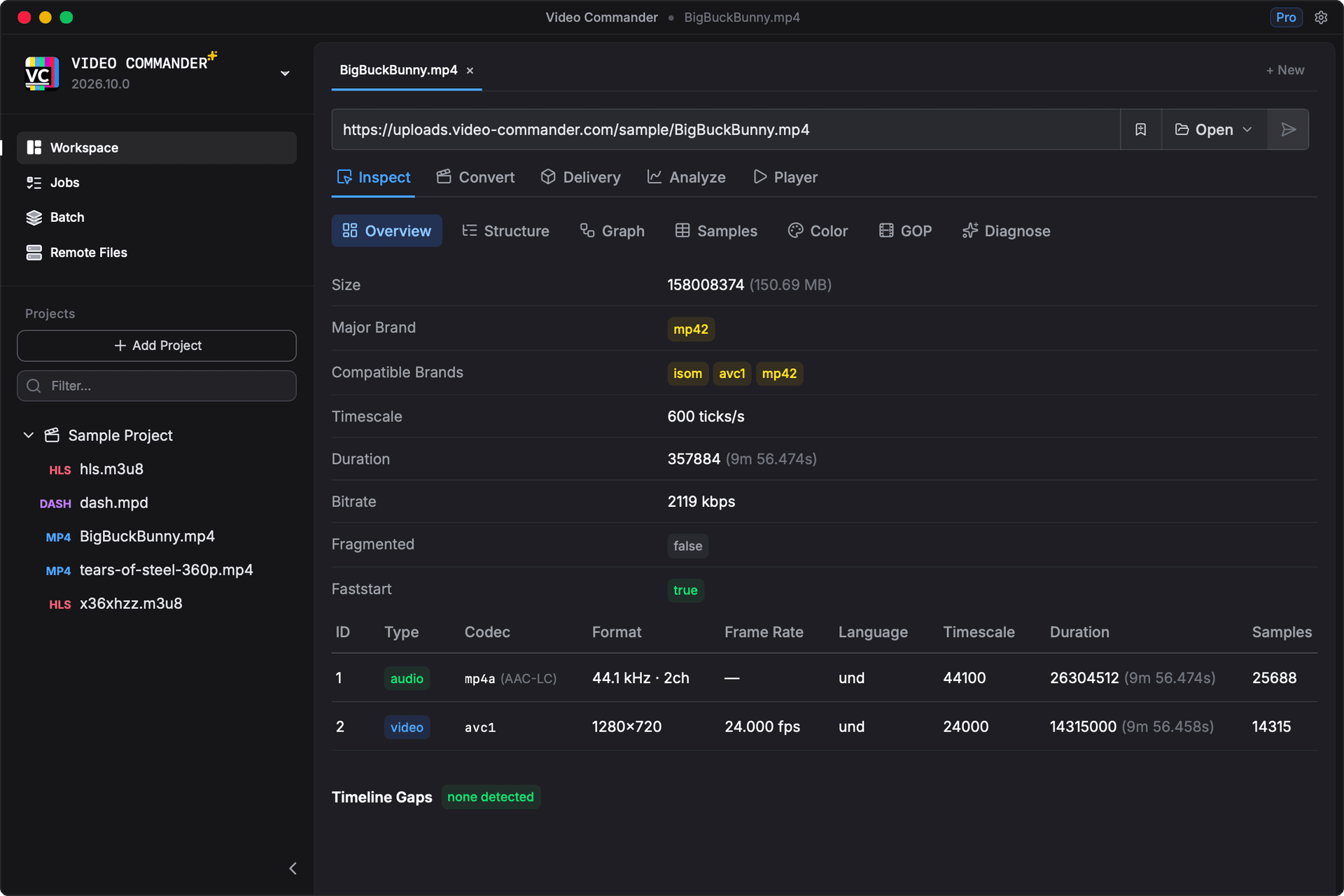
The real Inspect module
This is not a mockup. Overview, box structure, size graph, samples, GOP, and DRM views are the actual product code.
The desktop app goes further
Convert, validate, package, and AI diagnosis need the desktop app, along with MKV, AVI, and remote file support.
What you can inspect
The playground runs the full Inspect module. Colour, GOP, subtitle, event, and DRM views appear automatically when the file you load actually carries that data.
- Overview
- Container brands, timescale, duration, bitrate, and a per-track summary of codec, resolution, frame rate, and sample count.
- Structure
- The full ISOBMFF box tree. Expand moov, trak, mdia, and stbl, see each box offset and size, and read the raw bytes in a hex dump beside the parsed fields.
- Graph
- A size graph of the box layout, so you can see at a glance where the bytes actually go and whether moov sits before or after mdat.
- Samples
- A paged sample table per track with timestamps, decode and presentation times, sizes, and sync flags.
- GOP
- Keyframe placement and group-of-pictures layout for video tracks, which is where most adaptive streaming problems show up.
- Color
- Colour primaries, transfer characteristics, and matrix coefficients, including HDR10 signalling when the file carries it.
- Subtitles and Events
- Subtitle tracks and embedded captions, plus emsg event messages such as DASH and CMAF markers when present.
- DRM
- Encryption signalling with parsed PSSH boxes and the DRM systems each one belongs to.
Reads .mp4, .m4v, .m4a, and .mov, including fragmented MP4 and CMAF, up to 500 MB. For MKV, AVI, encoding, VMAF, packaging, and stream validation, see the full feature list.
Frequently asked questions
- Are my files uploaded anywhere?
- No. The inspection engine is compiled to WebAssembly and runs inside your browser tab, so the file is read locally and never sent to a server. You can confirm it by opening your browser network tab while you load a file.
- Which file types can I inspect in the browser?
- The playground reads the MP4 and ISOBMFF family: .mp4, .m4v, .m4a, and .mov, including fragmented MP4 and CMAF. MKV and AVI inspection needs the desktop app.
- Is there a file size limit?
- Browser files are capped at 500 MB, because the whole file is held in WebAssembly memory. The desktop app has no such limit. The playground can also read remote files over HTTP range requests, which is how the bundled 158 MB sample loads without downloading all of it.
- Do I need to install anything or create an account?
- Neither. Open the page, drop in a file, and the inspection views load. There is no sign-up, no upload step, and nothing to install.
- Is this the same as the desktop app?
- The Inspect module is the same product code, not a rebuilt demo. What the browser cannot do is the rest of the app: encoding and conversion, VMAF analysis, HLS and DASH packaging and validation, remote S3 browsing, and MKV or AVI support.
- Why does it ask for a bigger screen on mobile?
- The playground runs the desktop application interface, which needs room to be usable, so it only loads at 1024px and wider. On a phone you will see a preview instead. The desktop app is available for macOS and Windows.
How it runs in a browser tab
The desktop app is a Rust core behind a React interface. For the playground, that core is compiled to WebAssembly and the Tauri IPC layer is swapped for a shim, so the same views run unmodified against a parser in your browser instead of a native process.
Read how it was builtFree for personal use. macOS and Windows.