
Video Commander
FFmpeg GUI for macOS and Windows
Video Commander builds the FFmpeg command from a form, shows it to you before it runs, and lets you copy it into a script. Nothing is hidden.
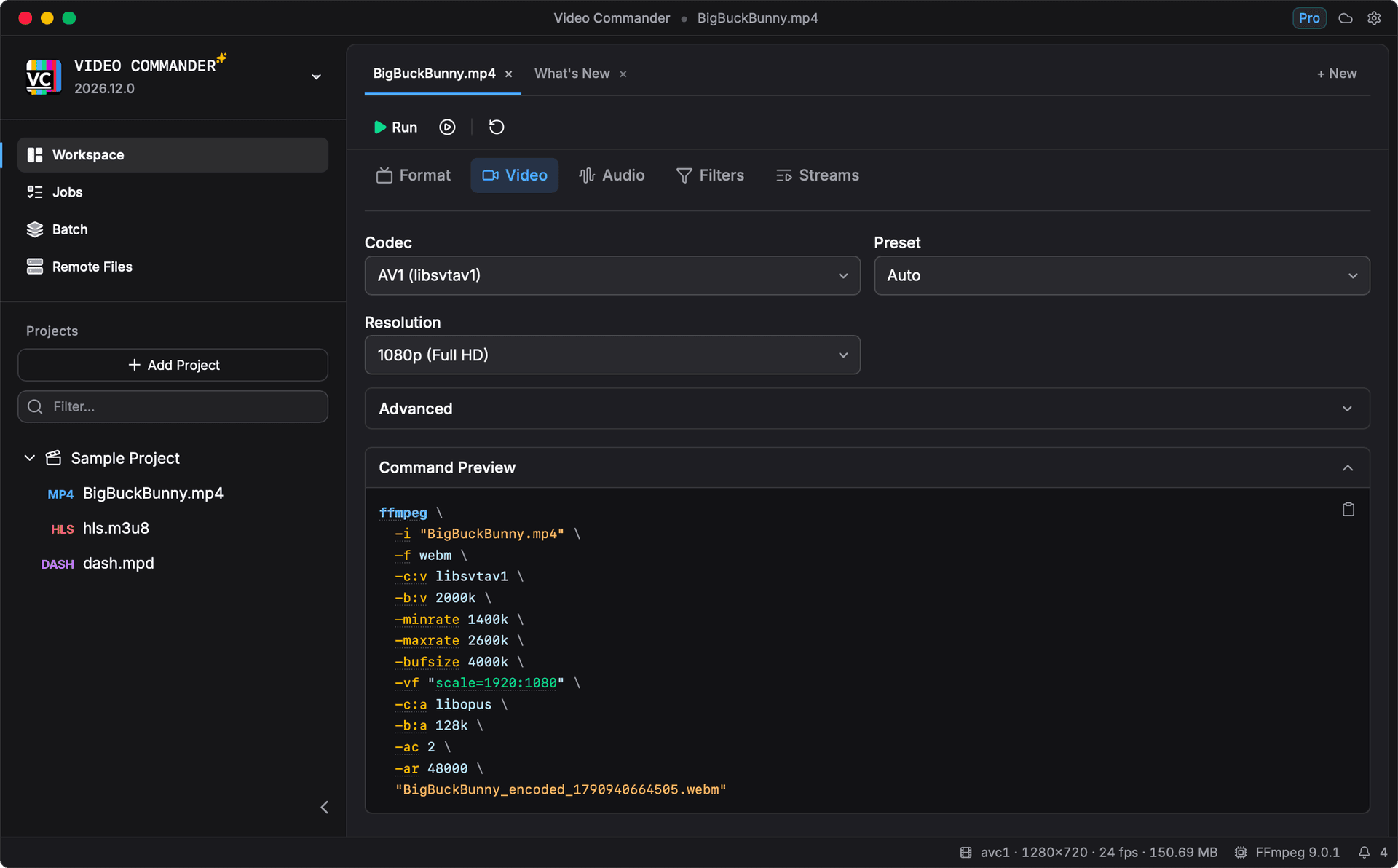
-c:v libsvtav1 and scale=1920:1080 below it, with rate control and audio settings written out in full. The copy button puts the whole thing on your clipboard for a script or a CI job.Is there a GUI for FFmpeg?
Yes. Video Commander is a desktop GUI for FFmpeg. The FFmpeg project provides command line tools, including ffmpeg and ffprobe, with no official graphical interface, so a GUI for FFmpeg means a separate application that wraps those binaries.
It runs natively on both desktop platforms. For install paths, hardware encoders, and platform screenshots, see the macOS page or the Windows page.
Every encoder your machine has.
Software x264, x265, VP9, and AV1, plus the hardware encoders your machine actually exposes. Rate control, filters, and audio sit in the same form, and each one writes itself into the command above.
- Video codecs
- H.264, H.265, VP9, and AV1 in software, plus VideoToolbox, NVENC, AMF, and Quick Sync where the hardware supports them. Stream copy for a remux.
- Rate control
- CRF, target bitrate, 1-pass and 2-pass, min and max rate, buffer size, GOP size, profile, level, preset, and tune.
- Filters
- Deinterlace, denoise with hqdn3d or NLMeans, sharpen, deband, deshake, deflicker, dejudder, crop, rotate, and colour adjustments.
- Audio
- AAC, MP3, Opus, and FLAC, mono through 7.1, bitrate and sample rate, audio delay, and EBU R128 loudness normalisation.
One setup, every file.
Point Batch at a folder, share one set of encode settings across the files, and each file becomes its own job. Jobs report live progress, elapsed time, and throughput, and run at whatever concurrency you set.
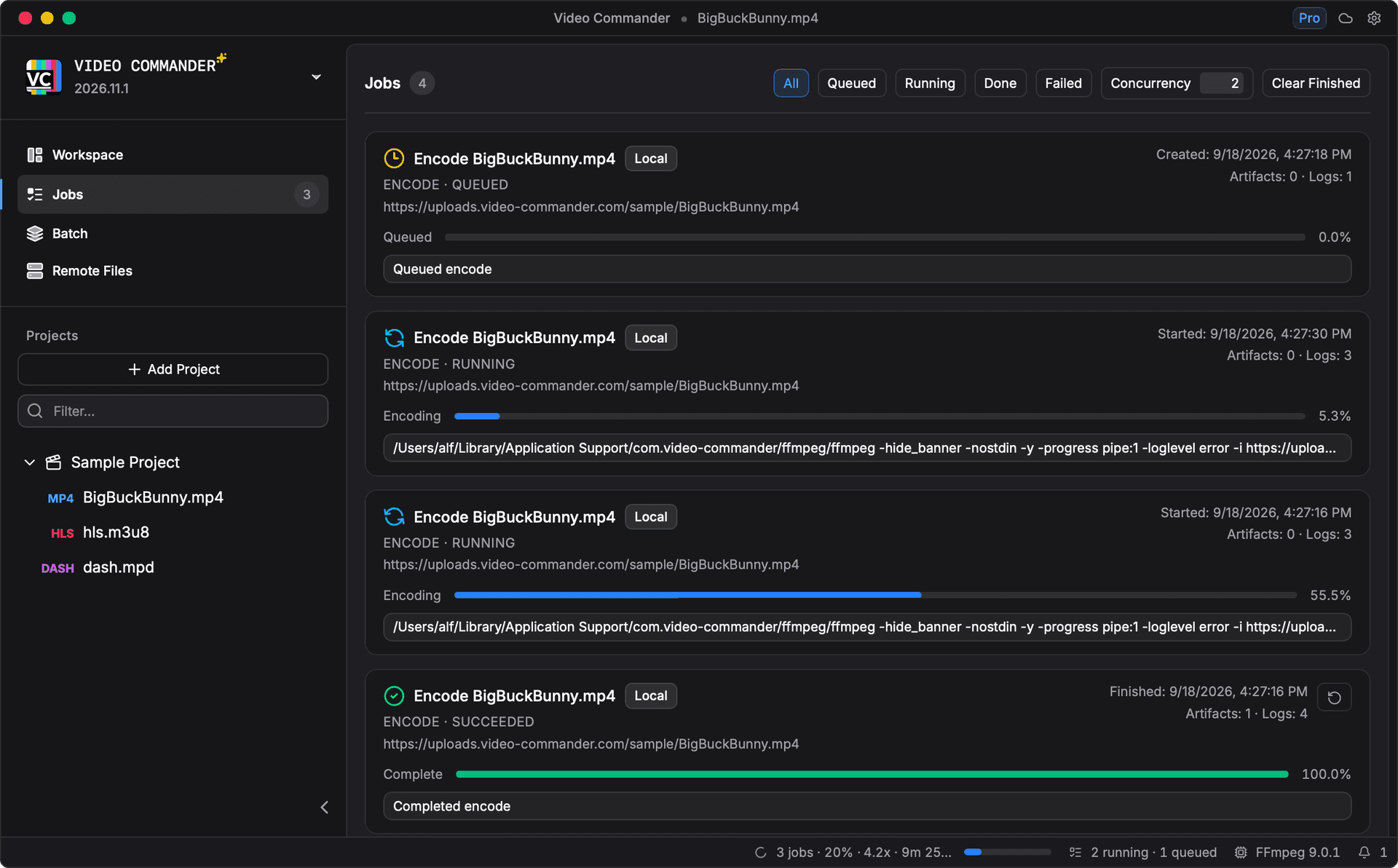
The command follows the job. A running job shows the FFmpeg line it is executing, and its detail view keeps that command, the live log, and the finished artifact, with Retry and Edit and Re-encode beside them.
Name a score, not a bitrate.
Set the VMAF score you want and the encoder searches for the lowest-bitrate CRF that reaches it. From the command line that means encoding, measuring, adjusting, and repeating, or writing a script that does.
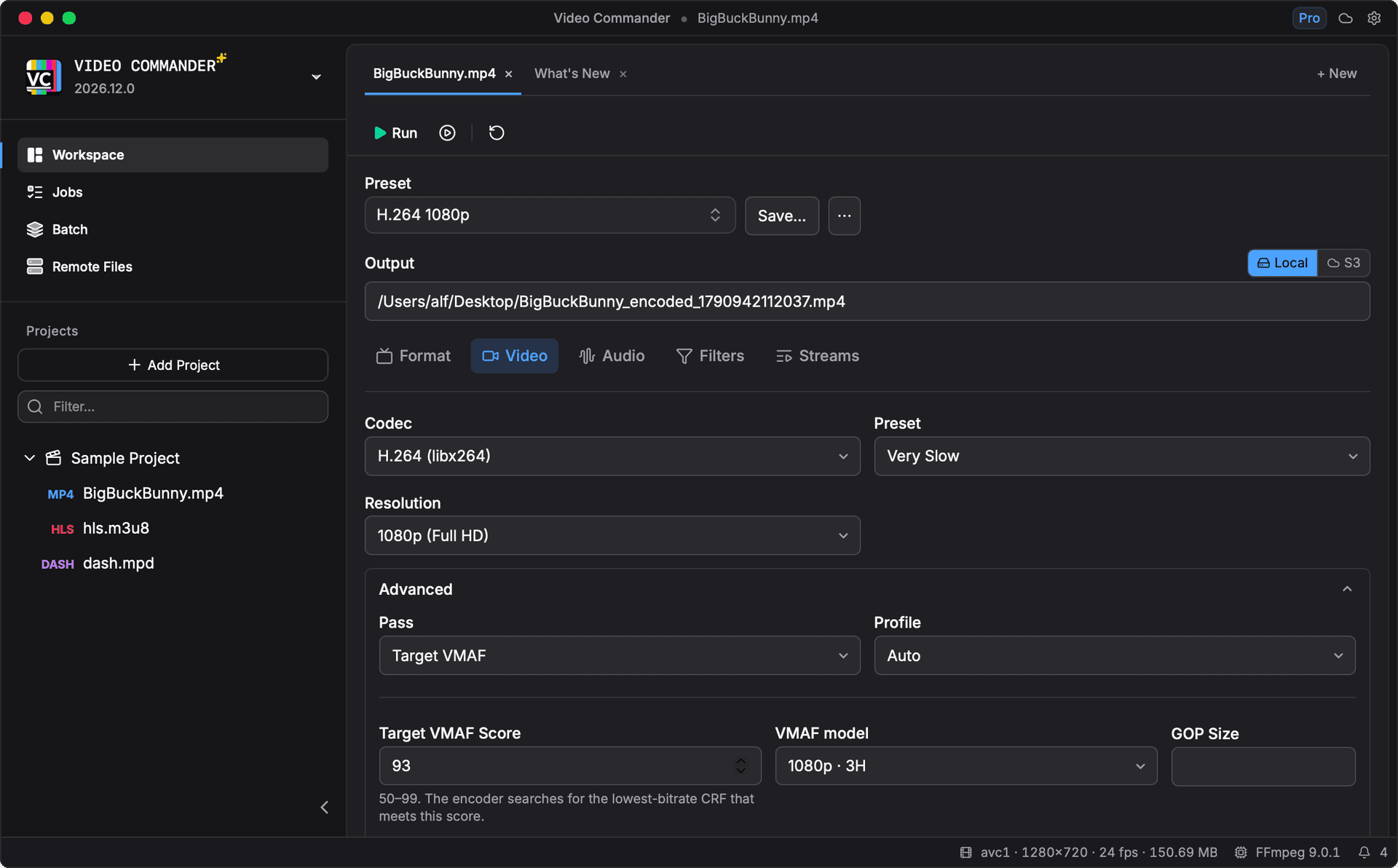
It runs as an ordinary job. Progress, logs, and the CRF it settled on land in the jobs queue like any other encode, and the result can be measured again from the Analyze view.
Also in the app.
- Inspect MP4 structure
- Box hierarchy, sample tables, and a hex dump, parsed natively without FFmpeg.
- Measure quality with VMAF
- VMAF v1 with HDR tone mapping, a per-frame timeline, frame comparison, and side-by-side runs.
- Package HLS and DASH
- Multi-rendition ladders, AES encryption, and a manifest validator that reads the output back.
Which FFmpeg GUI should you choose?
HandBrake uses FFmpeg libraries for transcoding. Shutter Encoder and Video Commander run FFmpeg through a graphical interface. If you want to keep working with the command itself, that is where they differ most.
| Tool | Shows the FFmpeg command | Useful for | Platforms | Cost |
|---|---|---|---|---|
| HandBrake | No. It calls the FFmpeg libraries in process. HandBrakeCLI is a separate tool with its own flags. | Preset-based encodes to MP4, MKV, or WebM. Audio and subtitle controls. Encode queue. | macOS, Windows, Linux | Free and open source |
| Shutter Encoder | Yes, in the console log after a run. You can also paste a raw FFmpeg command in. | ProRes and DNxHR conversion, rewrapping, cuts without re-encoding, render queues, MediaInfo, and VMAF. | macOS, Windows, Linux | Free; donations optional |
| Video Commander | Yes, inline and before the run. It rewrites as you change settings, and copies to the clipboard. | Command preview, MP4 boxes and sample tables, VMAF timelines, frame comparison, and HLS/DASH packaging. | macOS, Windows x64 | Free for personal and non-commercial use; $39 once for commercial use |
HandBrake always re-encodes video. Shutter Encoder can rewrap without re-encoding when the destination container supports the source codec; cuts may snap to keyframes.
Vendor documentation: HandBrake, Shutter Encoder and its documentation.
Before you download.
- Does FFmpeg have a GUI?
- FFmpeg ships as command line binaries (ffmpeg, ffprobe) with no official graphical interface. Video Commander is a separate desktop frontend that builds the command for you, runs the same binaries, and shows the output. It is available for macOS and Windows.
- Is there a free FFmpeg GUI?
- Video Commander is free for personal and non-commercial use on macOS and Windows, with no subscription. Commercial use is a $39 one-time license. It runs on your machine and processes everything locally.
- Can I use FFmpeg without the command line?
- Yes. Encoding, inspection, VMAF analysis, and HLS/DASH packaging all run from the interface. Video Commander shows the FFmpeg command it is about to run, so you can copy it into a script or CI job when you need to.
- Do I need to install FFmpeg separately?
- No. Video Commander can use FFmpeg from your PATH, download a managed build, or use a custom path you select in Settings. MP4 structure inspection does not need FFmpeg.
- Can I use the generated command in a script?
- Yes. Copy the FFmpeg command from the preview and use it in your terminal, a script, or a CI job. That environment needs FFmpeg and access to the input and output paths in the command.
- Which platforms does Video Commander support?
- macOS on Apple Silicon and Intel, and Windows 10 and 11 on x64. Linux is currently not supported.
The MP4 inspector also runs in your browser, with no install and no upload. Open the playground
Free to start. Pro for commercial work.
Video Commander is free for personal use. For client and commercial projects, Pro is a one-time $39, with free updates for life.
More Video Commander Tools
- FFmpeg GUI for macOS
- FFmpeg GUI for Windows
- HandBrake Alternative for macOS
- Video Encoder for macOS
- FFmpeg Batch Encoding
- MP4 Inspector for macOS
- MKV Inspector for macOS
- MP4Box GUI for macOS
- Video Metadata Inspector
- ffprobe GUI for macOS
- ffprobe Alternative for macOS
- MediaInfo Alternative for macOS
- VMAF GUI for macOS
- VMAF-Target Encoding
- HLS Validator for macOS