
Video Commander
FFprobe GUI for macOS
ffprobe is indispensable for inspecting media files, but reading through raw JSON or text output slows you down when you just need to know what's in a file.
Video Commander gives you a visual interface for the same data: codecs, streams, bitrates, container format, and track details, without writing a command.
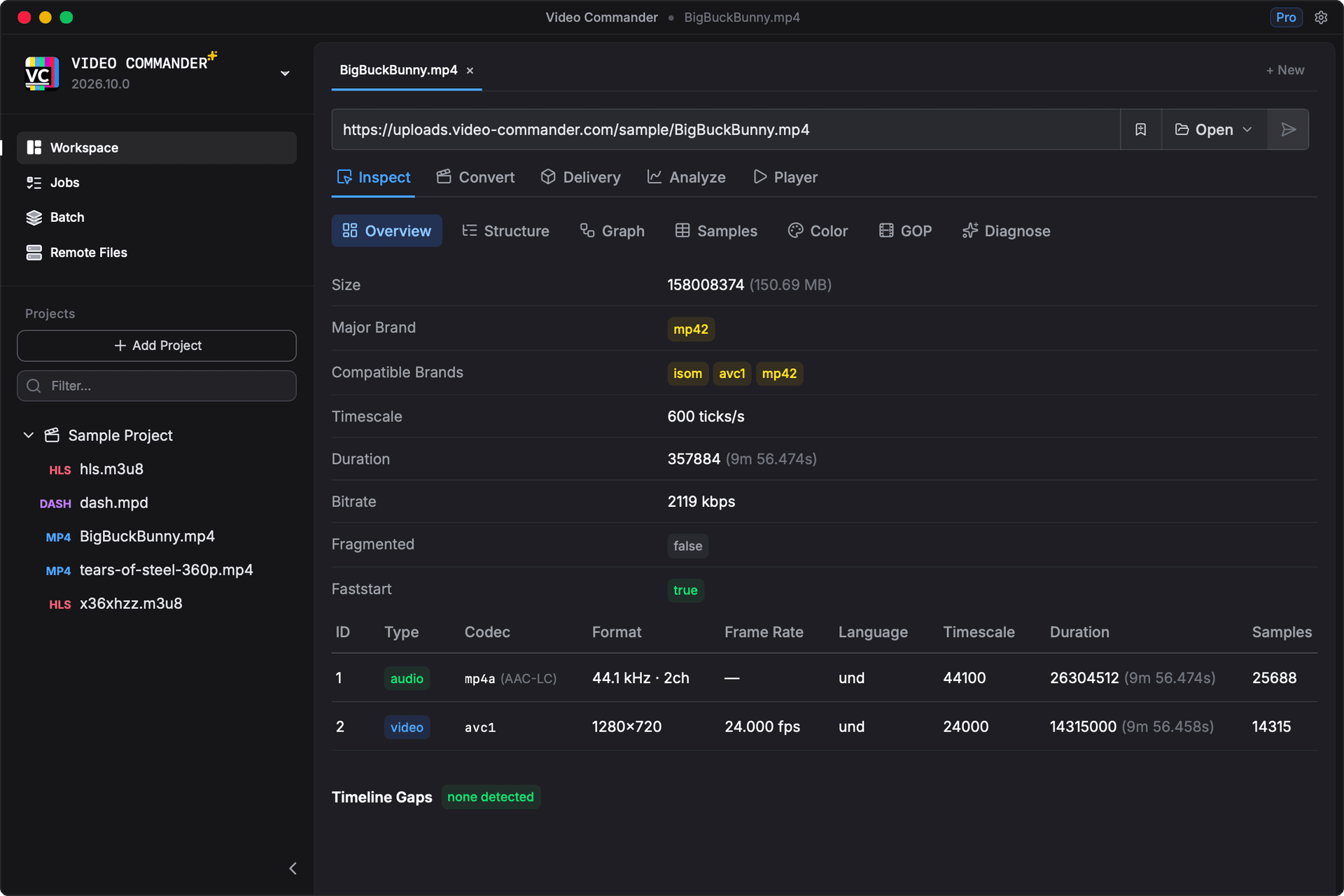
What You Can Inspect
- Video codec (H.264, HEVC, AV1, VP9)
- Audio codec, sample rate, channels
- Bitrate per track
- Container format and duration
- Color primaries and HDR metadata
- Timescale and timebase
- Resolution and frame rate
- MP4 box / ISOBMFF structure
FFprobe GUI vs Terminal Workflow
| Task | ffprobe CLI | Video Commander |
|---|---|---|
| View codec details | ffprobe -show_streams -v quiet file.mp4 | Structured stream panel |
| Check container format | ffprobe -show_format file.mp4 | Summary view with parsed fields |
| Inspect bitrate | Parse raw JSON or text output | Displayed per track |
| Debug multiple files | Repeat commands per file | Open and switch between files |
| Share findings with team | Copy terminal output | Readable visual layout |
The underlying data is the same. It is presented as structured panels rather than JSON or text you have to parse.
Frequently Asked Questions
- Is there a GUI for ffprobe on Mac?
- Yes. Video Commander provides a visual interface for the same media information ffprobe exposes: codecs, streams, bitrates, container format, in a structured, readable layout.
- Does Video Commander replace ffprobe?
- It covers the most common inspection workflows: viewing stream metadata, codec details, bitrates, and container info. For scripted or automated pipelines, ffprobe is still the right tool.
- Does it work on Apple Silicon?
- Yes. Video Commander is optimized for Apple Silicon and also supports Intel Macs.
- Is it free?
- Yes. Video Commander is a free download with no subscription required.
Download FFprobe GUI for macOS
Video Commander runs locally on macOS and supports Apple Silicon and Intel.
Download the Latest VersionLinux support coming soon.
Free to start. Pro for commercial work.
Video Commander is free for personal use. For client and commercial projects, Pro is a one-time $39, with free updates for life.
More Video Commander Tools
- FFmpeg GUI
- FFmpeg GUI for macOS
- FFmpeg GUI for Windows
- HandBrake Alternative for macOS
- Video Encoder for macOS
- FFmpeg Batch Encoding
- MP4 Inspector for macOS
- MKV Inspector for macOS
- MP4Box GUI for macOS
- Video Metadata Inspector
- ffprobe Alternative for macOS
- MediaInfo Alternative for macOS
- VMAF GUI for macOS
- VMAF-Target Encoding
- HLS Validator for macOS