
Video Commander
MKV Inspector for macOS
Matroska is a flexible container, which makes it hard to reason about from a terminal dump. Track types, codecs, languages, and metadata are easy to lose in mkvinfo output.
Open any MKV and explore its structure visually with Video Commander, built for engineers. Inspect tracks and metadata, then convert, run VMAF, or package HLS/DASH in the same desktop app.
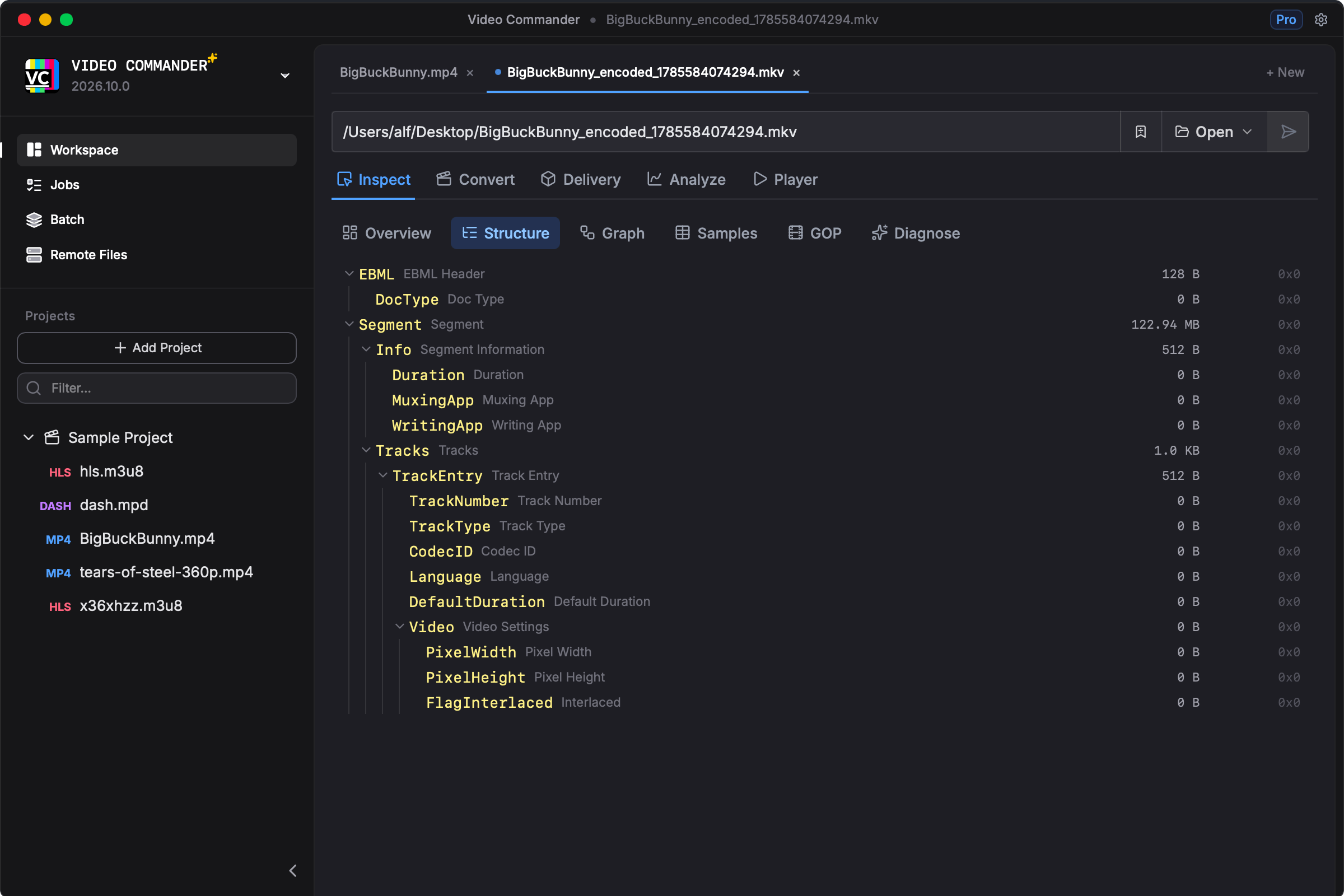
Desktop macOS. Built for Engineers.
- Apple Silicon & Intel support
- Offline-first
- All processing runs locally
- Free download, no subscription
- Transparent release notes
- Built by a professional media engineer
MKV Inspector vs Traditional CLI Workflow
| Task | Terminal Workflow | Video Commander |
|---|---|---|
| View Matroska track structure | mkvinfo -v / mediainfo | Visual track and element tree |
| List codecs and languages | mkvmerge -i | Structured stream overview |
| Read container metadata | Parse mkvinfo text output | Readable metadata panel |
| Convert MKV to MP4 | ffmpeg -i input.mkv -c copy out.mp4 | Visual encode settings, optional remux |
| Check quality after re-encode | Custom vmaf script | Built-in VMAF analysis |
| Package for streaming | Multiple CLI tools | Unified HLS/DASH interface |
Understand any MKV at a glance, then act on it without leaving the app.
Frequently Asked Questions
- Is there a free MKV inspector for macOS?
- Yes. Video Commander is a free download for macOS with no subscription required. It opens MKV (Matroska) files and shows track structure, codecs, languages, and metadata in a visual interface, locally on your machine.
- Can I inspect MKV files without the command line on a Mac?
- Yes. Instead of parsing mkvinfo or mediainfo output in the terminal, Video Commander presents the Matroska structure as a navigable tree with a readable stream overview.
- What container formats does Video Commander inspect?
- Video Commander inspects MKV (Matroska), MP4/ISOBMFF, and AVI containers. You can view track structure, codec details, and metadata, and move straight into encoding, VMAF analysis, or HLS/DASH packaging.
- Does Video Commander work on Apple Silicon?
- Yes. Video Commander supports both Apple Silicon (M-series) and Intel Macs.
Download the MKV Inspector for macOS
Video Commander runs locally on macOS and supports Apple Silicon and Intel.
Download the Latest VersionLinux support coming soon.
Free to start. Pro for commercial work.
Video Commander is free for personal use. For client and commercial projects, Pro is a one-time $39, with free updates for life.
More Video Commander Tools
- FFmpeg GUI
- FFmpeg GUI for macOS
- FFmpeg GUI for Windows
- HandBrake Alternative for macOS
- Video Encoder for macOS
- FFmpeg Batch Encoding
- MP4 Inspector for macOS
- MP4Box GUI for macOS
- Video Metadata Inspector
- ffprobe GUI for macOS
- ffprobe Alternative for macOS
- MediaInfo Alternative for macOS
- VMAF GUI for macOS
- VMAF-Target Encoding
- HLS Validator for macOS