
Video Metadata Inspector for macOS
Inspect MP4, MOV, HLS & DASH Metadata Without the Terminal
Read container structure, track layout, codec parameters, and manifest details from one app instead of several command line tools.
Video Commander is a professional video metadata inspector for macOS, built for engineers who need full visibility into their media files. Parse ISOBMFF structures, inspect tracks, analyze codecs, and debug streaming manifests, all in a native desktop interface.
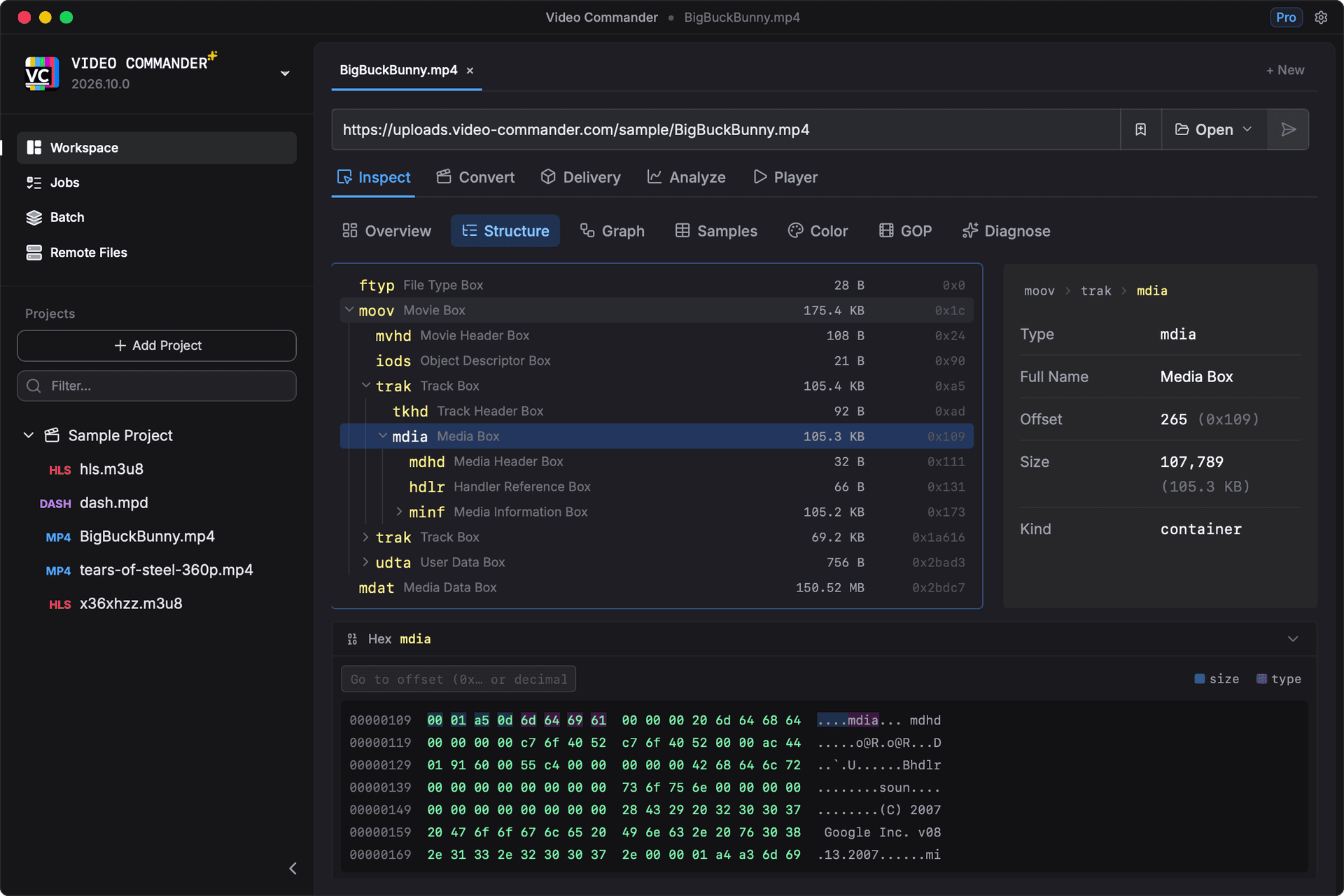
Or inspect an MP4 without installing anything in the browser playground, which runs the same parser in WebAssembly.
The Usual Tools
Media metadata is normally read with some combination of:
- ffprobe
- mp4dump
- mediainfo
- Custom scripts
- Bento4 utilities
Each is capable, and together they cover most of what Video Commander does. What they share is that the output is text:
- Reports are verbose, so scanning for one field takes a moment
- Box hierarchies are printed as indented text rather than navigated
- Comparing two files means diffing two dumps by hand
- Switching between tools means switching output formats
Video Commander reads the same structures and presents them as navigable panels, in one app rather than five.
What Video Commander's Metadata Inspector Does
Parse ISOBMFF / MP4 Box Structure
- Visual tree view of ftyp, moov, trak, mdia, stbl, and more
- Inspect timescales, durations, sample tables
- Identify missing or malformed atoms
- Analyze fragmented MP4 (fMP4) structures
You see the structure instantly, no scrolling through raw CLI output.
Track-Level Media Analysis
- Video codec (H.264, HEVC, AV1, etc.)
- Audio codec details
- Bitrate and resolution
- Color information (HDR metadata, color primaries)
- Timebase and duration validation
Perfect for verifying encodes before delivery.
HLS & DASH Manifest Inspection
- Inspect .m3u8 playlists
- Analyze segment structure
- Validate bitrate ladders
- Debug manifest inconsistencies
Stop switching between text editors and command-line tools.
Who It Is Built For
The feature set is aimed at streaming and delivery work rather than casual file browsing. Typical users are:
- Streaming engineers
- Encoding pipeline developers
- OTT platform teams
- Post-production technical QA
- Media tooling developers
The common thread is working at the level of atoms, tracks, segments, and timescales rather than files and folders.
Compare with CLI Tools
| Task | CLI Workflow | Video Commander |
|---|---|---|
| Inspect MP4 structure | mp4dump file.mp4 | Expandable visual box tree |
| View codec metadata | ffprobe -show_streams | Structured stream view |
| Debug HLS manifest | Open in text editor | Parsed manifest inspector |
| Validate timescales | Manual calculation | Displayed in context |
The same fields these tools report, read from the same structures, shown as panels you can navigate instead of text you have to scan.
Native macOS App, Offline First
- Apple Silicon optimized
- All processing runs locally
- Large-file friendly
- Built by a professional media engineer
Your media stays on your machine by default.
Frequently Asked Questions
- Does it replace ffprobe or mp4dump?
- No. It builds on the same underlying media structures, but provides a readable interface for faster debugging and inspection.
- Does it support fragmented MP4?
- Yes. Fragmented MP4 (fMP4) and streaming-ready outputs are fully inspectable.
- Can I use it for HLS and DASH?
- Yes. Manifest inspection and packaging visibility are built-in.
Download the Video Metadata Inspector for macOS
Video Commander includes the full metadata inspection tool in the desktop app.
Download the Latest VersionLinux support coming soon.
Free to start. Pro for commercial work.
Video Commander is free for personal use. For client and commercial projects, Pro is a one-time $39, with free updates for life.
More Video Commander Tools
- FFmpeg GUI
- FFmpeg GUI for macOS
- FFmpeg GUI for Windows
- HandBrake Alternative for macOS
- Video Encoder for macOS
- FFmpeg Batch Encoding
- MP4 Inspector for macOS
- MKV Inspector for macOS
- MP4Box GUI for macOS
- ffprobe GUI for macOS
- ffprobe Alternative for macOS
- MediaInfo Alternative for macOS
- VMAF GUI for macOS
- VMAF-Target Encoding
- HLS Validator for macOS